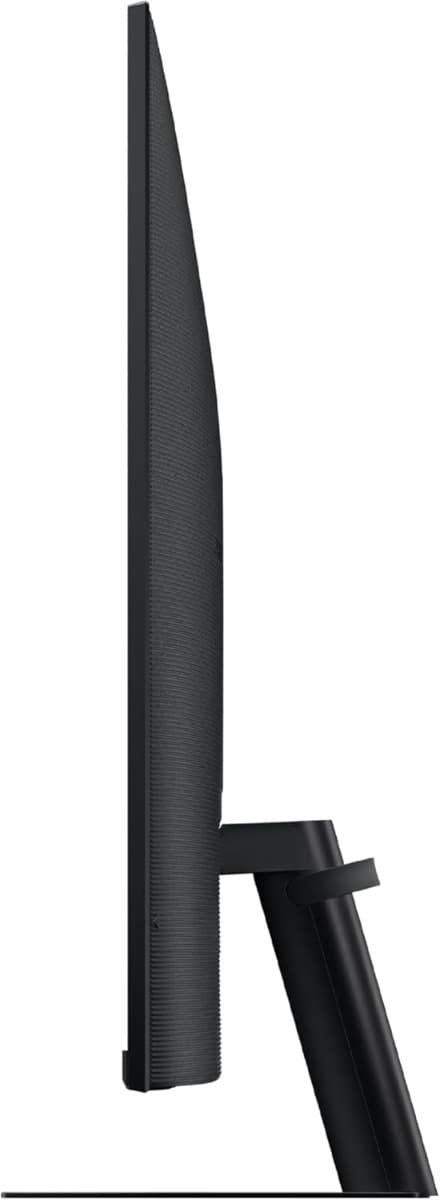
• Samsung 27" M50D Smart Screen for Multi Device Experience (LS27DM500EMXUE)
  • Samsung 27" M50D Smart Screen for Multi Device Experience (LS27DM500EMXUE)


    Door Delivery

    Delivery : Tomorrow 30th May, if you order before 2pm within Nairobi.

    Pick Up Delivery

    Ready for pickup : 2nd June - 4th June, it takes 48Hrs

    Disclaimer: Please note that we do not deliver over public holidays and also on Sundays.

    Everyday Value

    KES 42,995

    Or Redeem


    Bonga
    Equivalent to

    143,303

    Points

    You can redeem your Bonga Points and save. Check how much you can save.

    You can redeem your Bonga Points at the checkout and save. Calculate below

    Enter Bonga Points to calculate *

    Equivalent to KES 1,501 when redeeming on checkout


    Quantity:

    Screen Size (Class)
    27"

    Resolution
    FHD (1,920 x 1,080)

    Flat / Curved
    Flat

    Refresh Rate
    Max 60 Hz

    Display

    Screen Size (Class)
    27"

    Flat / Curved
    Flat

    Active Display Size (HxV, mm)
    597.888 (H) x 336.312 (V)

    Aspect Ratio
    16:9

    Panel Type
    VA

    Brightness (Typical, cd/m²)
    250

    Brightness (Min, cd/m²)
    200

    Contrast Ratio Static
    3,000:1 (Typ.)

    HDR (High Dynamic Range)
    HDR10

    Resolution
    FHD (1,920 x 1,080)

    Response Time
    4 ms (GTG)

    Viewing Angle (H/V)
    178° (H) / 178° (V)

    Color Support
    Max 1 Billion

    Color Gamut (NTSC 1976)
    72%

    Refresh Rate
    Max 60 Hz

    General Feature

    Eye Saver Mode
    Yes

    Flicker Free
    Yes

    Image Size
    Yes

    Windows Certification
    Windows 11

    Virtual AIM Point
    Yes

    Game Bar 2.0
    Yes

    HDMI-CEC
    Yes

    Auto Source Switch
    Auto Source Switch+

    Adaptive Picture
    Yes

    Ultrawide Game View
    Yes

    Smart Service

    Smart Type
    Smart

    Operating System
    Tizen™

    SmartThings Hub
    Yes

    Multi Device Experience
    Mobile to Screen, Screen Initiate Mirroring, Sound Mirroring, Wireless On, Tap View

    My Contents
    Yes

    Multi View
    Up to 2 videos

    NFT
    Nifty Gateway

    Remote Access
    Yes

    Interface

    Wireless Display
    Yes

    HDMI
    2 EA

    HDMI Version
    1.4

    HDCP Version (HDMI)
    2.2

    USB Hub
    2

    WiFi
    Yes (WiFi 5)

    Bluetooth
    Yes (5.2)

    Audio

    Speaker
    Yes

    Speaker Output
    10 W

    Adaptive Sound
    Adaptive Sound

    Operation Conditions

    Temperature
    10~40 ℃

    Humidity
    10~80% (non-condensing)

    Design

    Front Colour
    Black

    Rear Color
    Black

    Stand Color
    Black

    Stand Type
    Simple

    Tilt
    -2.0˚ (±2.0˚) ~ 22.0˚ (±2.0˚)

    Wall Mount
    100 x 100

    Eco

    Recycled Plastic
    N

    Power

    Power Supply
    AC 100~240 V

    Power Consumption (Max)
    50 W

    Type
    Internal Power

    Dimension

    Set Dimension with Stand (WxHxD, mm)
    615.5 x 455.4 x 193.5

    Set Dimension without Stand (WxHxD, mm)
    615.5 x 367.9 x 41.8

    Package Dimension (WxHxD, mm)
    738.0 x 126.0 x 428.0

    Weight

    Set Weight with Stand (kg)
    4.8

    Set Weight without Stand (kg)
    3.6


    Let me know if you’d like both specs combined in one document, or if you’d prefer a downloadable Word version!

    Description

    Multiple connections for your devices

    Multiple Ports

    Connect easily and create your customized set up using HDMI and USB-A ports without any adapters. Plug in to create your ideal multi-screen station.

    Where gaming comes together

    Gaming Hub

    Samsung Gaming Hub is the ultimate home for gaming. Instantly play the biggest games from top streaming partners, with no PC or console needed. Discover new games or replay old favorites all in one place.

    * Gaming Hub is available in limited countries, with app availability differing by country. UI is subject to change without prior notice.
    * Accessing Gaming Hub is free of charge. Subscription may be required to access content offered by game-stream providers on the Gaming Hub.
    * You may need to download apps depending on the game or service.
    * A separate controller may be required depending on the specific game you are playing on the Gaming Hub.
    * Requires internet connection.

    Simple control for your smart home

    SmartThings

    See all your smart home devices in a new 3D Map View, for an easier way to manage devices in different rooms. See energy usage and costs by device, and save money by turning on energy saving modes. Use your mobile phone to tap into the all-in-one IoT hub - all without pausing shows.


    * Available technology, functions and features may vary by country, service provider, network environment or product, and are subject to change without notice.
    * Requires a Wi-Fi, Bluetooth or other wireless network connection and devices registered to SmartThings app.
    * Connected devices are sold separately. For full compatible device list, please check https://www.smartthings.com/products.
    * Energy saving is only available for smart appliances that are compatible with AI Energy mode.
    * A separate SmartThings Dongle is required to connect to Zigbee and Thread devices. (Connection to Z-Wave device is not supported)

    "Monitor" your workouts like never before

    Workout Tracker

    Forget about boring workouts. Stream workout content, or run your own workout while watching contents on the Smart Monitor. Pair your Galaxy Watch to track real-time health data on the screen, while keeping streaming content on at the same time.

    * Supported exercise devices are Galaxy Watch 4 or later, and can be updated without notice. Requires Samsung account.

    Faster, easier access to your work tools

    Workspace

    Access and control your PC remotely, or work directly on the monitor. Embedded productivity apps like Microsoft 365 let you bypass the PC for a simpler, streamlined working environment.

    * On-screen content simulated for demonstration purpose.
    * Microsoft 365 requires Microsoft account. Some features of Microsoft 365 require subscription.
    * Windows 10 Pro, Mac OS 10.5, or higher, and compatible network settings are required for this feature.

    One mouse and keyboard across devices

    Multi Control

    Maximize your multitasking capabilities by effortlessly controlling multiple devices with a single mouse and keyboard. Experience greater efficiency with a single control station for your Smart Monitor, Galaxy Tab and Galaxy mobile device.

    * Each device must be registered with a single Samsung Account and connected to the same Wi-Fi network.
    * Multi control requires updated Galaxy phones and tablets with One UI 5.1 or above and Galaxy Book series devices released in 2021 or later with Samsung Settings v1.5(Intel) or Samsung Settings v3.3(ARM).
    * Some functions(such as Copy & Paste or Drag & Drop) may not be available when using certain device models and apps.
    * Feature availability may vary by region(e.g. not provided in People's Republic of China).
    * Screen images simulated for illustrative purpose.
    * Multi Control connectivity to a Galaxy mobile or tablet without a Galaxy Book will be available following an update in May.

    Designed for low vision users

    Vision Accessibility Tools

    The Smart Monitor is designed with accessibility in mind, particularly for low vision users. It comes equipped with tools that help them see and use the screen more easily, including screen magnification, color switching, and audio descriptions for TV settings like the volume and channel.


    Get warranty on
    all mobile
    phones
    Same day delivery
    within Nairobi
    Free returns /
    exchanges
    within 7 days